Showing posts with label universal design for learning. Show all posts

Monday, December 4, 2023

Just how inclusive is your science curriculum?

There are four questions I urge you to go and investigate in your school... 
  1. If I struggled to read and write, how much of the learning in your year 9 and 10 programmes would be accessible to me?
  2. How many of the scientists who are acknowledged in your school's science curriculum are women? Māori? Pasifika? BIPOC? 
  3. How many Māori and Pasifika students graduate from your school with 3 UE STEM subjects? 
  4. How many Māori and Pasifika students from your school go on to a science pathway?


    I am a science teacher. I enjoy science. But the more I learn about culturally sustaining pedagogy, students with diverse learning needs, equity, and feminism, the more frustrated I have become with science. To become a 'scientist,' you have to find a way to pay for a bachelor's degree, master's degree, and a PhD. If you are lucky you might then get a lowly paid postdoc position after that. This is hard for individuals to afford, never mind for those people with a family for which they are financially responsible. If you don't have a family that can support you financially through all these years of studying, what are the chances that you become a scientist? 

    I also think about the experience I had of science at school. All assessments required a lot of reading and writing, even at years 9 and 10. If you are a student who struggles with literacy, how accessible is our school science curriculum to you? And as a result, what impact does that have on your scientific literacy in the future? In the misinformation crisis that the world currently finds itself in, surely science teachers should be focussing on designing the most inclusive and accessible curriculum possible? (Note, I do not suggest we water down the science, only that we make it more accessible). 

    It is with the above in mind that I spent a significant amount of effort in the last few years working on how the science ideas that we teach in year 9 and 10 can be made more accessible through the way I design learning. Here are a few of the things that stand out from this year. 


    Engineering challenges

    Physics has many great opportunities for students to explore scientific concepts in a hands on way. One of the tried and tested ways to do that is by haivng students design small vehicles within a set of constraints, and then race them. As a result, I saw students investigate aerodynamics, how to reduce friction, how mass and accelleration might relate to each other, and a whole bunch more. The vehicle on the right was particularly memorable as the group experimented with using wax on the bottom of their racer to help it glide down the racing ramp easier.


    Other engineering challenges include building an arthropod that is able to move. For this, students had to learn about the characteristics and taxonomy of different arthropods, as well as learning about the physics of simple machines to help their arthropods move. The arthropod machine on the right used a wheel and axle to create their insect that moves with wind. It was particularly rewarding being able to work with a hard materials teacher who was able to help students construct and prototype their designs in the workshop. 


    Art 

    A favourite medium that I like to use when encouraging students to communicate science ideas is through art. This has involved everything from photo essays, illustrations, performances and more. However this year I was able to take my love for art and science to a new level by co-teaching with an art teacher. Students explored a socio-scientific issue of their choice from a provided list. As they explored the scientific, cultural, economic, ethical and other perspectives of their issue, they created a series of artworks to represent their understanding of these. 

    The image below shows the Alexander Calder inspired mobiles students made to represent the different persepctivees around their socio-scientific issue. 


    A critical skills in science is observation. Few things teaches observation as well as teaching drawing skills in art. Hence, another task that worked really well was having students create a nature journal page of a native species of plant. You can see the task instructions below along with an example of a student's work. 


    Prioritising tools with UDL features

    A fairly simple way of creating a more inclusive classroom is just about being more selective with the tools we use. For example, Quiziss is a en excellent tool. While it works much like Kahoot, Quizizz has the added benefit of being able to read the questions out loud to students. The tools is gamified for extra engagement and gives students instant feedback. On the teacher side of things, this tool is compatable with Google Classroom which means I can keep track of student understanding really easily. 

    I am also a serious user of Google Classroom. When used effectively, it means that students can use speech to text tools to read instructions for tasks. Hence, I religiously post every single instruction for my class on Google Classroom. It also means that it easy to make videos, audio recordings, diagrams, etc. available for students. 


    Where to next?

    In 2024 I hope to continue exploring ways to make science more inclusive, I am looking forward to working with the new level 1 NCEA standards to find ways to assess these in the most creative, inclusive way possible. 

    Tuesday, September 7, 2021

    Ghostbusters! - Dealing with ghosting students in lockdown (and the classroom).

    We are back in lockdown thanks to COVID and the delta variant. As the days pass while teaching remotely, it becomes increasingly apparent that some students struggle to engage in lockdown more than others. And some of them try their best to ghost you. As always, it is often these disengaged students that are the most vulnerable and at risk. So how do we get them engaged again? 

    What became overwhelmingly clear as I sifted through the research, teacher, and student feedback is that good practice is good practice - regardless of whether you are teaching in person or remotely. All of the recommended practices, strategies, tools, etc. reflect the key messages from the OECD's The Nature of Learning report. (If you haven't read this yet, do so urgently. It provides a really great summary of research to inspire good teaching practice.)

    Of particular relevance are the 8 basics of student motivation that this report summarises:


    This post is a list of ideas, recommendations, and best practices compiled from teacher feedback on Twitter, reports from ERO (New Zealand Education Review Office), the Education Hub, as well as a student survey done at Hobsonville Point Secondary School. 

    How do you know if you have a ghost?
    The Responding to the Covid-19 crisis: Supporting Auckland NCEA students report clearly identifies that the longer a student is disengaged, the harder it is to reengage them. Hence, it is important to reach out to disengaged students as early as possible. Additionally, focussing on the relationship first appears to be a key aspect of getting our ghosts engaged, and keeping them engaged
    • Setting up tasks that 'self mark' so that it is easy to track disengagement with minimal effort eg. Google Quiz through Google Classroom, Quizizz, Playposit, Education Perfect, Pear Deck. 
    • Using the assignment function through Google Classroom to make it easy to see when students have turned in work or turned work in late. 
    • Using the grade book function in learning management systems (eg. Google Classroom) to track overall engagement. 
    • Doing a roll in synchronous video calls. 

    How do you stop them from being ghosts in the first place?
    As with so many other things in education, relationships are at the heart of the matter. Hence, we need to think about how we might maintain our focus on relationships, with students and between students. This is also great for helping students to manage their well-being in lockdown as the absence of their peers can have a detrimental effect on their mental health.  Some ways to do this include:
    • Smaller group asynchronous video calls rather than large group calls.
    • Personal emails to check in with students. 
    • Collaborative tasks that require students to reach out to their peers. 
    • Pastoral group meetups for fun. eg. quiz, pictionary, etc. 
    • Private comments through Google Classroom as reminders.
    • Email telling them I am thinking about them and miss them in class will often do the trick, especially with higher year levels. 
    • Email whanau. Call whanau if still nothing. 
    • Organising a one on one video call to check in and help problem solve any issues acting as obstacles in proceeding with learning. 
    • Organising small group synchronous video calls specifically for students who are struggling. 
    • Connecting students who need extra support with a counsellor, teacher aide to help as appropriate.
    • Support students with building self-regulating skills. Eg. helping them to fill in a daily planner, teaching them productivity tools eg. single-tasking, quick writes, kanban, etc. 
    • Don't give up. Keep emailing and calling, keep getting in touch to check how the student is doing. 

    How do you set ghost busting tasks?
    During a lockdown, it is much easier for students to opt-out of tasks that are boring, busy work, too hard, etc. Hence, the quality of the work tends to have a much bigger impact on student engagement than when we are in their faces at school actively nagging them. The research and student voice is really clear about the kinds of tasks that help to keep students engaged and as a result, motivated. As a result, we should focus on designing tasks that are:
    • Set tasks that are clearly linked and matched to the intended learning outcomes that students know and value - aka. moving beyond low-level tasks and “busy work” to tasks that students feel are important and meaningful. 
    • Scaffold. Scaffold. Scaffold. Students don't have access to the teacher or peers in the same way as at school so making sure that the tasks is broken down in a way that is easy for them to make sense of is key. 
    • Shorter instructions, which broke tasks into chunks, tended to be more effective in scaffolding students through the learning.
    • Ramping up the difficulty level in tasks as you go along to ensure that all students feel a measure of success when completing tasks. (SOLO works really well for this - see example)
    • Using Universal Design for Learning practices eg. 
      • Supplementing written instructions for tasks with short video explanations.
      • Offering personal 60 second video lessons for question messaged in the private chats.
      • Mixing up the type of tasks eg. hands-on.
    • Reduce the fear of failure such as by using gamification eg. Kahoot.
    • Providing students with a degree of choice over how they completed a task typically led to greater engagement in the learning and a higher probability of the task being completed. 

    How do you help the students manage themselves in order to avoid ghosting?
    Despite 'managing self' being one of the key competencies of our New Zealand curriculum, lockdown really highlights our short fall in helping students develop self-regulation skills. There are a number of ways that we can help students improve their self-management, and as a result, improve their engagement and motivation during lockdown and at school. Additionally, maintaining high expectations and holding students accountable for meeting these expectations is also critical for maintaining students’ motivation and engagement and facilitating learning. 

    • Ensuring flexibility in when students can do work. Too many set times reduces engagement and opportunities for self-management. 
    • Setting realistic amounts of work. Don't fall into the planning fallacy (a prediction phenomenon, all too familiar to many, wherein people underestimate the time it will take to complete a future task, despite knowledge that previous tasks have generally taken longer than planned.)
    • Set work at the start of the week so that students can plan out how they will do their learning for the week. 
    • Setting tasks that are truly independent as parents and caregivers are not always able to support.
    • Don't overload students with too much information or communication - keep it simple and concise with a clear and easy option for following up if they have questions.
    • Make videos for students to watch in their own time. 
    • Must do/Should do/Could do tasks to ensure that workload can match student context, but also to provide a sense of agency. 
    • Setting deadlines and time limits of tasks, and following up with students who have not met these. 
    • Supporting students to complete a daily planner to help them identify deadlines and prioritise their efforts (see student example from Hobsonville Point Secondary). 
    • Providing regular formative assessment and feedback that was connected to the expectations set by the teacher was crucial for motivation and engagement as well as for ongoing learning.
    • Students who established some form of routine or daily structure were more likely to stay up-to-date with work and to maintain their engagement. eg. daily small group check-in, daily planner. 
    • Use coaching conversations (eg GROW coaching) to help students problem solve and self determine their next steps. 

    Hopefully, there are some helpful ideas in here to help with your ghosts. If you have more ideas of things that have worked for you. Please leave them in the comments too!

    Further reading

    Saturday, September 8, 2018

    Edtech Evolution

    In 2012 as a beginning teacher, I wrote a blog post about the e-learning tools I was using in my classroom. At the time, the internet was rife with various blog posts, tweets, etc of various educators sharing how they were trying, testing and using e-learning tools in their classrooms. It was these early posts that first introduced me to the wonders and marvels of the blended learning world. I learnt about the power of learning management systems to support students to become autonomous. I revelled in the authenticity of the real world collaboration that social media made possible for my students. I flourished and thrived in the online communities of teachers.

    Nearly 6 years later and the use of digital technology has accelerated at an incredible pace. Many educators are using scratch and makey-makey like it is no big deal. Others are using 3D printing, laser cutters and virtual reality in their day-to-day practice. So much has happened! However, I recently went on a hunt to find some blog posts that describe how various educators are using these new fandangled tools in their classrooms. I remember spending hours in 2012 pouring over the many posts about how others were using e-learning, byod, etc. in their classrooms. While I am sure that there are many out there, it was much harder to find recent posts than what I anticipated! Perhaps this is because we have passed the 'popularity' phase of e-learning. We are no longer concerned with the latest and greatest cool tool on the block, and have become increasingly focussed on the deeper learning? How do we use e-learning to amplify learning, not just use technology for technology's sake? In response, I thought I would share some of the tools that I use now. Of course, my pedagogy has evolved massively since the time of my first post. Here is a brief snapshot of the tools I use now and the pedagogy/theory that underpin them.

    Fuelled by my role at Hobsonville Point Secondary School where the students are flying the plane and I am just the air traffic controller, I needed something to help me manage all the independent projects that were happening at any given moment. This can be a real juggle, especially when there are delayed flights (students not making enough progress), flights that arrive early (students making really fast progress), multiple flights arriving at once (many students needing your attention all at once) and emergency flights (urgent things that need to be addressed eg. inappropriate behaviour). I use a number of tools to help me manage the project based, personalised and autonomous learning environments that I strive to create.

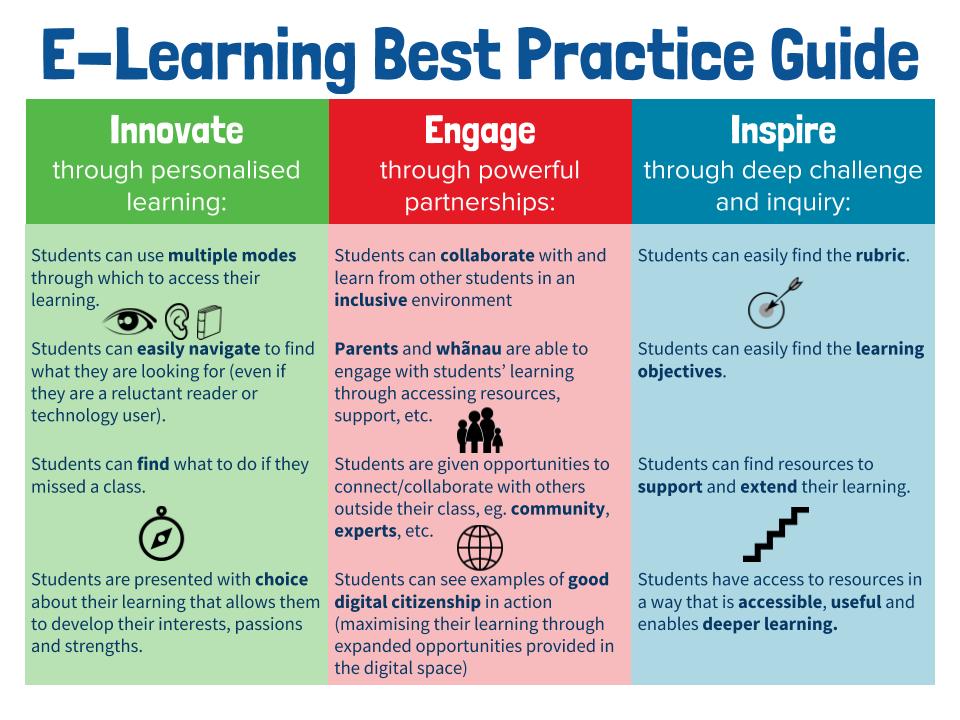
    Every lesson begins with a do now in the Google Classroom. Every lesson begins with a self-explanatory 'DO NOW' so that students can come to class and get started on the learning without me. This gives me time to do the roll, talk to late students, check in with students who were away, etc. The whole lesson and learning objective is also outlined in the Google Classroom along with the relevant resources. This means that students who are away can catch up on their learning. Students who finish activities quickly can also move on to the next task. We also add the rubrics and assessments in the about section of the Google Classrooms. Our use of Google Classroom is largely informed by our original HPSS e-learning best practice guide. You will see the influence of assessment for learning and universal design for learning quite heavily in this document. The image below shows the 'should do' section of our best practice guide.

    My use of Google Classroom and our best practice guide has been heavily informed by:
    • Hattie, J. (2008). Visible learning: A synthesis of over 800 meta-analyses relating to achievement. Routledge.
    • Hall, T. E., Meyer, A., & Rose, D. H. (Eds.). (2012). Universal design for learning in the classroom: Practical applications. Guilford Press.
    • Absolum, M. (2011). Clarity in the classroom: Using formative assessment for building learning-focused relationships. Portage & Main Press.
    • Voice of our students.


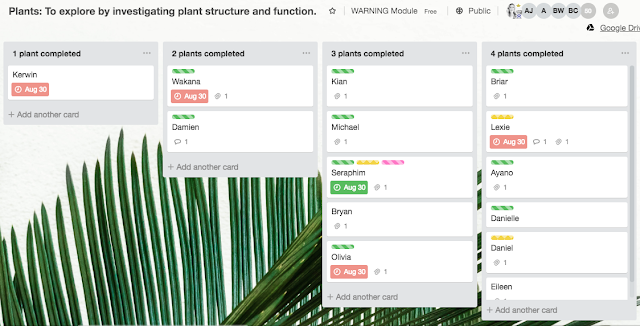
    Trello is without a doubt my favourite tools to manage my air traffic controller role. Trello allows me to quickly identify students who are behind or ahead, students who need help, students who are struggling, etc. I set up the tasks students need to work through in each column and the names of the students/groups as cards. As students complete activities, they simply move their cards along. I have even used Trello for assessments since the cards allow you to attach files, set due dates on tasks, add comments, and track your interactions on the board. We also use the labels to signpost if students need help or are making progress.

    The reason why Trello is without a doubt one of my favourite classroom e-learning tools is that it facilitates the kind of autonomous student learning environment that I am working hard to develop. Additionally, using this tool in conjunction with agile and scrum has meant that it can also be used to facilitate collaboration as it allows students to see their contributions, progress and involvement.

    My use of Trello has been influenced and inspired by:
    • Adkins, L. (2010). Coaching agile teams: a companion for ScrumMasters, agile coaches, and project managers in transition. Pearson Education India.
    • Facer, K. (2011). Learning futures: Education, technology and social change. Routledge.

    Trello

    Trello


    Trello

    The latest tool that I have been using is Kialo. The website attempts to do "empower reason through friendly and open discussions." While there are some interesting debates happening on the platform, I have found it's the greatest merit the ability to map out perspectives, evidence, opinions and claims for an argument. Not only can you find some great examples of how to structure an argument, but you can also build your own. We have really enjoyed how everyone in the class can find ways to contribute, whether it is through adding their own claims or evidence to an argument, or whether it is through voting on the impact of others' claims. Additionally, after building an argument collectively as a class, you have created a digital, collaborative artefact to act as a resource for future use.

    My use of Kialo has been informed by:
    • Scardamalia, M., & Bereiter, C. (2010). A brief history of knowledge building. Canadian Journal Of Learning and Technology, 36(1). doi: http://dx.doi.org/10.21432/T2859M
    • Hipkins, R., Bolstad, R., Boyd, S., & McDowall, S. (2014). Key competencies for the future. Wellington, New Zealand: NZCER Press.
    • Gilbert, J. (2005). Catching the knowledge wave? The knowledge society and the future of education. Wellington, New Zealand: New Zealand Council for Educational Research.
    • Gilbert, J. (2007). Knowledge, the disciplines, and learning in the Digital Age. Educational Research for Policy and Practice, 6(2), 115-122. doi:10.1007/s10671-007-9022-1
    Kialo

    As I wrote this post, it struck me just how much my pedagogy has evolved. I have become increasingly focused on translating academic and scholarly work into a workable classroom version. (That means I genuinely enjoy having a good debate about epistemological integrity and then working out what that could and should mean for the class I am teaching this week.) I also recognise some of the early elements of my practice that are still present too. For example, I still think that saving time is a key filter for the tools I use. Electronic grade books, automarking and productivity tools are all a key strategy to juggle the many demands of being a teacher. The time I freed up by getting Flubaroo to mark the quiz was time I could spend on high quality feedback instead! 

    So my education friends... I am curious what e-learning tools you use now and why? What is it that has stood the test of time for you? Perhaps it's time for a circa 2014 chain blogging event? Tag three people to share their #edtechevolution?

    PS: Some other tools I have used recently include Playposit, Google Cardboard, Kahoot, Quizizz, Google Maps, Google Earth, Google docs/sheets/presentations/drawings, Piktochart, YouTube, Socrative, videonot.es, Read Write for Google, Equatio, iQualify, Khan Academy, Soundcloud, Garage Band, iMovie, Screencastify and so many more! 

    Tuesday, February 14, 2017

    A quick visual guide to online learning at HPSS

    For all those visual learners out there... Here are two visuals that I have developed in my role as e-learning specialist classroom teacher to briefly summarise e-learning at Hobsonville Point Secondary School. The first graphic is aspirational, the second is essential!
    PS: All images shared on this blog are creative commons, hence feel free to share.


    Thursday, March 17, 2016

    Why have an online home for your class?

    In an effort to remind myself why I believe in e-learning tools, as we as to encourage others to do the same, I have created a summary that might be useful. Feel free to share and distribute. You can access the Google Drive drawing here for editing and easy sharing purposes.


    I would love your feedback on this, as always!

    Sunday, December 6, 2015

    Are exams an anachronism?

    As exam season for schools and universities around the country draws to a close, I find myself (again) reflecting on the purpose, point and goals of exams. Hence, I have a few questions for Mr Exam. I would appreciate if someone could pass the questions on. Or at least speculate on what his answers might be.

    • Why should students attempt to 'prove' their understanding in an artificial context? What is the point of recalling facts and skills in an artificial environment? Would you go into a meeting or a presentation at work without your notes? You can take notes into a job interview. When solving complex problems at work you are certainly not expected to solve them from memory! We do careful research, we collaborate, we seek feedback, we refine. When I have struggled with particular aspects of a role, I often make notes for myself. I check over them to help me complete the task. I struggle to understand why students should be expected to recall without notes, without their peers, without context and without an authentic purpose? When you have to use recall for your drivers licence test, there is a purpose. What is the point of recall in exams?

    • Do exams value recall or deep thinking? All of the most profound moments of realisation, understanding, application in my life, and I am betting yours, did not happen in exams. It involved deeply thinking in light of new experiences, information, discussion and so forth. Does this mean that exams are not about thinking? Perhaps they are about regurgitating and recalling your thinking? Although, I suspect it might also be about recalling someone else's thinking and not your own.
    • Do exams value efficiency or efficacy, quality? When students are given contrived time limits to recall and apply facts, skills, etc. are we suggesting that it is how fast you are able to do things, not how well? Are we suggesting that learning, Knowledge, skills, capabilities can be packaged into two and three hour blocks?
    • How can we possibly allow for diversity when we are expecting a whole country to sit the same exams? There are piles of research about the euro-centric approach in education, and piles about Maori and Pacifica frequently not 'achieving' at the same rate off pakeha (New Zealand European). This phenomenon is evident in other countries with indigenous peoples too. By making a whole country, district, class, year level sit the same exam, by standardising, are we ignoring cultural capital? Are we suggesting that cultural capital does not matter in academia? Why should all students know and think the same things? Does standardisation ignore and devalue diversity? 

    •  Are exams about equity or equality? All students are expected to write the external 'English exam' or 'Maths exam' at the same time, regardless of what is going on for them in their life. +Ros MacEachern gives a great example from her last school where students were leaving exams early because they were hungry. How many other factors like this is going on? Is that fair?
    • Are we assessing their writing or their understanding? All students, regardless of their strengths, preferences, cultural traditions, personal experiences, family situations and so forth at expected to 'write' exams. They have to give written explanations of their understanding. All teachers know students who can give incredible verbal explanations but struggle to do so in writing. We all learn differently, communicate differently yet exams seem to ignore this? Where do exams make space for different modes of thinking, learning and communicating?
    • How do exams help to build a better future? The value that we attach to exams, explicitly, implicitly and tacitly, are they actually making the world a better place? What values are they instilling in students? What are they teaching students, the community and families to value? What are they teaching about how we assess and individual? What are they teaching about what matters about an individual? Or about a group?

    As far as I can tell, exams are not about learning, not about thinking and not about Knowledge. So what is the point? Are they just an an anachronism? A tool from a past age where standardisation was more valued than diversity? Where Knowlege was confined to the pages of linear books rather than the multi-dimensional reality of the real world? If the purpose of exams were about learning and thinking, how would they be different? Are we still making kids and students write exams because coming up with something better has simply been lumped into the too hard basket?