Showing posts with label assessment for learning. Show all posts

Tuesday, December 5, 2023

Assessment for Learning

How do we ensure that learning is progressing for every student? 

Perhaps the most important thing that I have learned in my 10+ years of teaching is that more teaching doesn't mean more learning. More explanations at the front of the class doesn't mean more learning is happening. More worksheets and more tasks don't mean students are making progress. So what does make a difference? In my opinion, it is those three fundamental questions from John Hattie, how are you going, where are you going, where to next. If students do not know what they are supposed to learn, how they are supposed to learn it, and what their next steps are to learn it, then how can they take charge of managing their own learning? How can they develop a shared responsibility and a shared sense of agency? 


There are a number of practices that I have embraced and focused on doing consistently to ensure that my students know what they are supposed to learn, how they are supposed to learn it, and what their next steps are to learn it. There is overwhelming evidence that shows Assessment for Learning not only improves agency and shared responsibility, it also accelerates progress for Māori and Pasifika students. While it is easy to think of Assessment for Learning as more work, like everything, the more you practice something, the easier and faster you become at it. I am really proud of the effort I have put into developing Assessment for Learning practices that are at the core of my teaching practice.


Here are some of the things that I have noticed that really make a difference for my students. 


Instant feedback quizzes 

There are a number of reasons why I love Kahoot, Gimkit, Blooket, Quizizz and the Google Forms quiz function in Google Classroom. First of all, their reporting functions tell me in a quick, minimal-effort way where my students need additional support in their learning, who needs additional support, and who needs to be extended. It means that class time can thus be prioritised for maximum impact. 


The second reason I love instant feedback quizzes is because it gives students instant feedback about their progress in understanding ideas. I also frequently set a quiz for two weeks at a time on Quizizz. Students are then expected to reattempt the quiz until they can improve their score. This allows students to have a concrete but simple next step in their learning. This is particularly great in science where large amounts of vocabulary are often a barrier to student learning. 

As a separate perk, I also appreciate that students who struggle to produce evidence of their learning find a gamified quiz a much less intimidating way to show their progress. 


Google Classroom


Google Classroom has a number of features that allow teachers to improve the pace at which they give feedback. There are three features that I use a lot.
  • Rubrics
    I have set up a separate Google Classroom called Rubrics. In this Classroom I have created lots of rubrics that students often need feedback on, or things that I am tracking. Eg. I have a work completion rubric, a SOLO taxonomy rubric, and a paragraph writing rubric. I have also added the rubrics against which we assess for reporting purposes. Having these rubrics in their own classroom means it takes me all of one minute to add the relevant rubric to a task in Google Classroom. I can then also very quickly give feedback on student work by just clicking the relevant part of the rubric. I have also set each of these up with grades which helps track over time which students are falling behind, excelling, or making good progress. 


  • Gradebook function 
    The grade book function in Google Classroom is a great way to track student progress. However, I found it most powerful when I tag assignments that will be used for formal assessments and deciding report grades. This helps students know where to prioritise their efforts. In addition, about a week before I start marking for formal reporting purposes, I get students to look at their overall grade on Google Classroom and then reflect on whether they are satisfied with what grade this translates to on their report. This usually results in a flurry of activity and prioritisation as students then do some really purposeful work where they focus not just on getting work done, but improving the quality of their work. This means that students also actually pay attention to the feedback I leave them on their work. 

  • Comments functions
    Google Classroom allows you to save a bank of comments. This means that when you type feedback comments on student work, it automatically starts suggesting the full comment. As a result, I have saved comments for common feedback items eg. "This question asks your to explain in depth, hence, you will need more detail in your explanation. Try this PEEL writing guide to help you gain more depth." I then also include the link the necessary resource to help coach the student through their specific next step. This amazing Google Classroom feature means that the process of giving feedback is sped up as I don't spend hours typing and copying and pasting the same things. It also means that I can point each student to the resource they need for their next step in a much more expedient way. 


ChatGPT

For my senior students, I have also been experimenting with using ChatGPT to help them improve the quality of their work by giving them specific prompts to use for feedback on specific tasks.  For example:
  • Check the accuracy of the biological claims in this text. Make an itemised list of inaccuracies.
  • Compare this text with the following criteria. (Insert achievement criteria).
  • Check this text for any redundancy. Make an itemised list of things that can be removed from the text.
As a human, I am severely limited in the pace of feedback I can give. AI on the other hand is really good at reading fast. Hence, I have been experimenting with how we can use AI in an ethical way to help students improve their learning. 


Where to next?
Next year I am keen to continue exploring the use of AI in helping students get better, more timely feedback on their learning. I think I might just have to finally invest in ChatGPT 4. 

Saturday, September 8, 2018

Edtech Evolution

In 2012 as a beginning teacher, I wrote a blog post about the e-learning tools I was using in my classroom. At the time, the internet was rife with various blog posts, tweets, etc of various educators sharing how they were trying, testing and using e-learning tools in their classrooms. It was these early posts that first introduced me to the wonders and marvels of the blended learning world. I learnt about the power of learning management systems to support students to become autonomous. I revelled in the authenticity of the real world collaboration that social media made possible for my students. I flourished and thrived in the online communities of teachers.

Nearly 6 years later and the use of digital technology has accelerated at an incredible pace. Many educators are using scratch and makey-makey like it is no big deal. Others are using 3D printing, laser cutters and virtual reality in their day-to-day practice. So much has happened! However, I recently went on a hunt to find some blog posts that describe how various educators are using these new fandangled tools in their classrooms. I remember spending hours in 2012 pouring over the many posts about how others were using e-learning, byod, etc. in their classrooms. While I am sure that there are many out there, it was much harder to find recent posts than what I anticipated! Perhaps this is because we have passed the 'popularity' phase of e-learning. We are no longer concerned with the latest and greatest cool tool on the block, and have become increasingly focussed on the deeper learning? How do we use e-learning to amplify learning, not just use technology for technology's sake? In response, I thought I would share some of the tools that I use now. Of course, my pedagogy has evolved massively since the time of my first post. Here is a brief snapshot of the tools I use now and the pedagogy/theory that underpin them.

Fuelled by my role at Hobsonville Point Secondary School where the students are flying the plane and I am just the air traffic controller, I needed something to help me manage all the independent projects that were happening at any given moment. This can be a real juggle, especially when there are delayed flights (students not making enough progress), flights that arrive early (students making really fast progress), multiple flights arriving at once (many students needing your attention all at once) and emergency flights (urgent things that need to be addressed eg. inappropriate behaviour). I use a number of tools to help me manage the project based, personalised and autonomous learning environments that I strive to create.

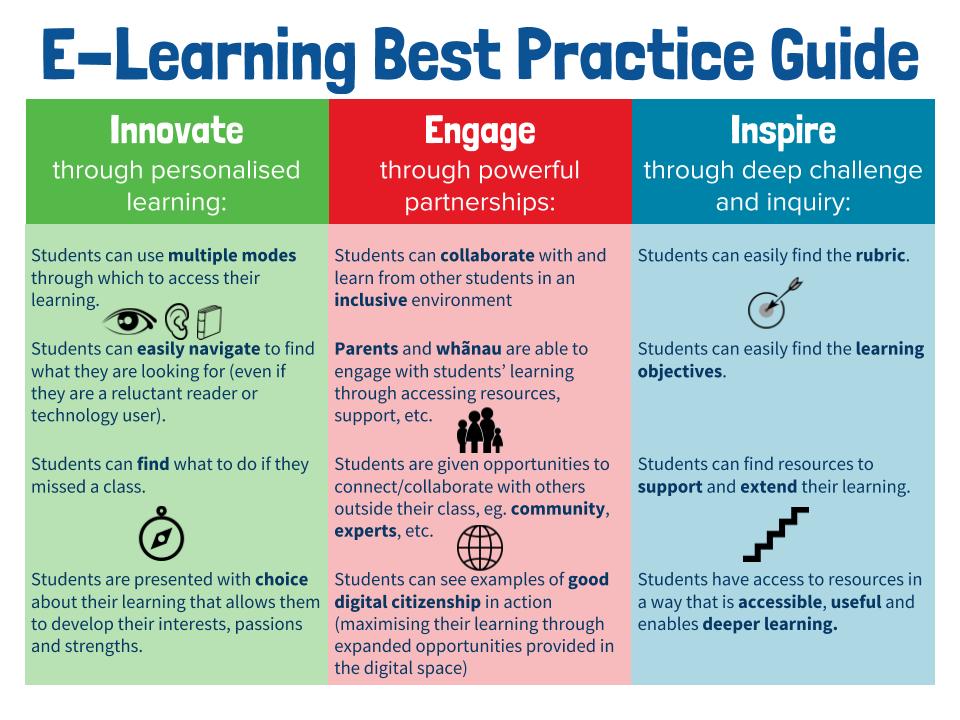
Every lesson begins with a do now in the Google Classroom. Every lesson begins with a self-explanatory 'DO NOW' so that students can come to class and get started on the learning without me. This gives me time to do the roll, talk to late students, check in with students who were away, etc. The whole lesson and learning objective is also outlined in the Google Classroom along with the relevant resources. This means that students who are away can catch up on their learning. Students who finish activities quickly can also move on to the next task. We also add the rubrics and assessments in the about section of the Google Classrooms. Our use of Google Classroom is largely informed by our original HPSS e-learning best practice guide. You will see the influence of assessment for learning and universal design for learning quite heavily in this document. The image below shows the 'should do' section of our best practice guide.

My use of Google Classroom and our best practice guide has been heavily informed by:
  • Hattie, J. (2008). Visible learning: A synthesis of over 800 meta-analyses relating to achievement. Routledge.
  • Hall, T. E., Meyer, A., & Rose, D. H. (Eds.). (2012). Universal design for learning in the classroom: Practical applications. Guilford Press.
  • Absolum, M. (2011). Clarity in the classroom: Using formative assessment for building learning-focused relationships. Portage & Main Press.
  • Voice of our students.


Trello is without a doubt my favourite tools to manage my air traffic controller role. Trello allows me to quickly identify students who are behind or ahead, students who need help, students who are struggling, etc. I set up the tasks students need to work through in each column and the names of the students/groups as cards. As students complete activities, they simply move their cards along. I have even used Trello for assessments since the cards allow you to attach files, set due dates on tasks, add comments, and track your interactions on the board. We also use the labels to signpost if students need help or are making progress.

The reason why Trello is without a doubt one of my favourite classroom e-learning tools is that it facilitates the kind of autonomous student learning environment that I am working hard to develop. Additionally, using this tool in conjunction with agile and scrum has meant that it can also be used to facilitate collaboration as it allows students to see their contributions, progress and involvement.

My use of Trello has been influenced and inspired by:
  • Adkins, L. (2010). Coaching agile teams: a companion for ScrumMasters, agile coaches, and project managers in transition. Pearson Education India.
  • Facer, K. (2011). Learning futures: Education, technology and social change. Routledge.


Trello

Trello


Trello

The latest tool that I have been using is Kialo. The website attempts to do "empower reason through friendly and open discussions." While there are some interesting debates happening on the platform, I have found it's the greatest merit the ability to map out perspectives, evidence, opinions and claims for an argument. Not only can you find some great examples of how to structure an argument, but you can also build your own. We have really enjoyed how everyone in the class can find ways to contribute, whether it is through adding their own claims or evidence to an argument, or whether it is through voting on the impact of others' claims. Additionally, after building an argument collectively as a class, you have created a digital, collaborative artefact to act as a resource for future use.

My use of Kialo has been informed by:
  • Scardamalia, M., & Bereiter, C. (2010). A brief history of knowledge building. Canadian Journal Of Learning and Technology, 36(1). doi: http://dx.doi.org/10.21432/T2859M
  • Hipkins, R., Bolstad, R., Boyd, S., & McDowall, S. (2014). Key competencies for the future. Wellington, New Zealand: NZCER Press.
  • Gilbert, J. (2005). Catching the knowledge wave? The knowledge society and the future of education. Wellington, New Zealand: New Zealand Council for Educational Research.
  • Gilbert, J. (2007). Knowledge, the disciplines, and learning in the Digital Age. Educational Research for Policy and Practice, 6(2), 115-122. doi:10.1007/s10671-007-9022-1
Kialo

As I wrote this post, it struck me just how much my pedagogy has evolved. I have become increasingly focused on translating academic and scholarly work into a workable classroom version. (That means I genuinely enjoy having a good debate about epistemological integrity and then working out what that could and should mean for the class I am teaching this week.) I also recognise some of the early elements of my practice that are still present too. For example, I still think that saving time is a key filter for the tools I use. Electronic grade books, automarking and productivity tools are all a key strategy to juggle the many demands of being a teacher. The time I freed up by getting Flubaroo to mark the quiz was time I could spend on high quality feedback instead! 

So my education friends... I am curious what e-learning tools you use now and why? What is it that has stood the test of time for you? Perhaps it's time for a circa 2014 chain blogging event? Tag three people to share their #edtechevolution?

PS: Some other tools I have used recently include Playposit, Google Cardboard, Kahoot, Quizizz, Google Maps, Google Earth, Google docs/sheets/presentations/drawings, Piktochart, YouTube, Socrative, videonot.es, Read Write for Google, Equatio, iQualify, Khan Academy, Soundcloud, Garage Band, iMovie, Screencastify and so many more! 

Wednesday, June 4, 2014

Data Detective and a Trifecta of Tools

Flubaroo generate spreadsheet (student names removed)
Maybe it's because I did a science degree, maybe because I am an empiricist. Either way, I like having data to make decisions around. Education rockstar researcher Hattie emphasises how important feedback from the students about how they're learning is. So I wanted to share a trifecta of tools that help the busy teacher use data more effectively.
ideas about gravity before teaching and learning

ideas about gravity after teaching and learning
Step 1: A quick google form at the beginning of a lesson with an open ended question e.g. What do you understand about gravity? Followed with a few multi choice questions that look at common misconceptions about gravity.
Google forms work well on all platforms and devices including smart phones

Then... I use flubaroo (a google docs add on) to grade it very quickly on a spreadsheet. This gives me a spreadsheet with the lowest scoring students automatically in red. Hence, immediately I can move forward with differentiated tasks, team roles etc. based on what the students know.
Flubaroo is a simple to use google apps add on - when in a google spreadsheet, simply click on add ons and then install it


Step 2: Teaching and learning takes places including a range of different strategies.

Step 3: Students take the same test
Then... I use flubaroo again to see if students have made a shift in their understanding. Today, my students shifted from a 1.72 out of 4 to a 2.42 out of 4. I can also then identify which students need more intensive scaffolding or support in the next session.

Finally, I use word it out to paste the answers from the open ended question creating a before and after version with the students' answers. From the before and after I can see that students are now able to describe gravity with the vocabulary that I introduced today including mass, attracted and pull.
Word it out is a free tool that creates a word wall where the size of a word increases based on its frequency in the text that you input.

And with my trifecta of tools I can identify the students that need to be extended next time as well as the students that need to be supported. Using the view summary function in google forms I can also see how many of my students started with misconceptions about gravity and how many finished with the same or perhaps new misconceptions.

Before teaching and learning

After teaching and learning

The reality is that being a data detective just means that I am taking a really brutal, honest look at my own teaching. I can see that students no longer think that only planets have gravitational fields, but I can also see that there are still students who think that the moon has no gravity.