Showing posts with label e-learning. Show all posts

Tuesday, December 5, 2023

Assessment for Learning

How do we ensure that learning is progressing for every student? 

Perhaps the most important thing that I have learned in my 10+ years of teaching is that more teaching doesn't mean more learning. More explanations at the front of the class doesn't mean more learning is happening. More worksheets and more tasks don't mean students are making progress. So what does make a difference? In my opinion, it is those three fundamental questions from John Hattie, how are you going, where are you going, where to next. If students do not know what they are supposed to learn, how they are supposed to learn it, and what their next steps are to learn it, then how can they take charge of managing their own learning? How can they develop a shared responsibility and a shared sense of agency? 


There are a number of practices that I have embraced and focused on doing consistently to ensure that my students know what they are supposed to learn, how they are supposed to learn it, and what their next steps are to learn it. There is overwhelming evidence that shows Assessment for Learning not only improves agency and shared responsibility, it also accelerates progress for Māori and Pasifika students. While it is easy to think of Assessment for Learning as more work, like everything, the more you practice something, the easier and faster you become at it. I am really proud of the effort I have put into developing Assessment for Learning practices that are at the core of my teaching practice.


Here are some of the things that I have noticed that really make a difference for my students. 


Instant feedback quizzes 

There are a number of reasons why I love Kahoot, Gimkit, Blooket, Quizizz and the Google Forms quiz function in Google Classroom. First of all, their reporting functions tell me in a quick, minimal-effort way where my students need additional support in their learning, who needs additional support, and who needs to be extended. It means that class time can thus be prioritised for maximum impact. 


The second reason I love instant feedback quizzes is because it gives students instant feedback about their progress in understanding ideas. I also frequently set a quiz for two weeks at a time on Quizizz. Students are then expected to reattempt the quiz until they can improve their score. This allows students to have a concrete but simple next step in their learning. This is particularly great in science where large amounts of vocabulary are often a barrier to student learning. 

As a separate perk, I also appreciate that students who struggle to produce evidence of their learning find a gamified quiz a much less intimidating way to show their progress. 


Google Classroom


Google Classroom has a number of features that allow teachers to improve the pace at which they give feedback. There are three features that I use a lot.
  • Rubrics
    I have set up a separate Google Classroom called Rubrics. In this Classroom I have created lots of rubrics that students often need feedback on, or things that I am tracking. Eg. I have a work completion rubric, a SOLO taxonomy rubric, and a paragraph writing rubric. I have also added the rubrics against which we assess for reporting purposes. Having these rubrics in their own classroom means it takes me all of one minute to add the relevant rubric to a task in Google Classroom. I can then also very quickly give feedback on student work by just clicking the relevant part of the rubric. I have also set each of these up with grades which helps track over time which students are falling behind, excelling, or making good progress. 


  • Gradebook function 
    The grade book function in Google Classroom is a great way to track student progress. However, I found it most powerful when I tag assignments that will be used for formal assessments and deciding report grades. This helps students know where to prioritise their efforts. In addition, about a week before I start marking for formal reporting purposes, I get students to look at their overall grade on Google Classroom and then reflect on whether they are satisfied with what grade this translates to on their report. This usually results in a flurry of activity and prioritisation as students then do some really purposeful work where they focus not just on getting work done, but improving the quality of their work. This means that students also actually pay attention to the feedback I leave them on their work. 

  • Comments functions
    Google Classroom allows you to save a bank of comments. This means that when you type feedback comments on student work, it automatically starts suggesting the full comment. As a result, I have saved comments for common feedback items eg. "This question asks your to explain in depth, hence, you will need more detail in your explanation. Try this PEEL writing guide to help you gain more depth." I then also include the link the necessary resource to help coach the student through their specific next step. This amazing Google Classroom feature means that the process of giving feedback is sped up as I don't spend hours typing and copying and pasting the same things. It also means that I can point each student to the resource they need for their next step in a much more expedient way. 


ChatGPT

For my senior students, I have also been experimenting with using ChatGPT to help them improve the quality of their work by giving them specific prompts to use for feedback on specific tasks.  For example:
  • Check the accuracy of the biological claims in this text. Make an itemised list of inaccuracies.
  • Compare this text with the following criteria. (Insert achievement criteria).
  • Check this text for any redundancy. Make an itemised list of things that can be removed from the text.
As a human, I am severely limited in the pace of feedback I can give. AI on the other hand is really good at reading fast. Hence, I have been experimenting with how we can use AI in an ethical way to help students improve their learning. 


Where to next?
Next year I am keen to continue exploring the use of AI in helping students get better, more timely feedback on their learning. I think I might just have to finally invest in ChatGPT 4. 

Tuesday, September 7, 2021

Ghostbusters! - Dealing with ghosting students in lockdown (and the classroom).

We are back in lockdown thanks to COVID and the delta variant. As the days pass while teaching remotely, it becomes increasingly apparent that some students struggle to engage in lockdown more than others. And some of them try their best to ghost you. As always, it is often these disengaged students that are the most vulnerable and at risk. So how do we get them engaged again? 

What became overwhelmingly clear as I sifted through the research, teacher, and student feedback is that good practice is good practice - regardless of whether you are teaching in person or remotely. All of the recommended practices, strategies, tools, etc. reflect the key messages from the OECD's The Nature of Learning report. (If you haven't read this yet, do so urgently. It provides a really great summary of research to inspire good teaching practice.)

Of particular relevance are the 8 basics of student motivation that this report summarises:


This post is a list of ideas, recommendations, and best practices compiled from teacher feedback on Twitter, reports from ERO (New Zealand Education Review Office), the Education Hub, as well as a student survey done at Hobsonville Point Secondary School. 

How do you know if you have a ghost?
The Responding to the Covid-19 crisis: Supporting Auckland NCEA students report clearly identifies that the longer a student is disengaged, the harder it is to reengage them. Hence, it is important to reach out to disengaged students as early as possible. Additionally, focussing on the relationship first appears to be a key aspect of getting our ghosts engaged, and keeping them engaged
  • Setting up tasks that 'self mark' so that it is easy to track disengagement with minimal effort eg. Google Quiz through Google Classroom, Quizizz, Playposit, Education Perfect, Pear Deck. 
  • Using the assignment function through Google Classroom to make it easy to see when students have turned in work or turned work in late. 
  • Using the grade book function in learning management systems (eg. Google Classroom) to track overall engagement. 
  • Doing a roll in synchronous video calls. 

How do you stop them from being ghosts in the first place?
As with so many other things in education, relationships are at the heart of the matter. Hence, we need to think about how we might maintain our focus on relationships, with students and between students. This is also great for helping students to manage their well-being in lockdown as the absence of their peers can have a detrimental effect on their mental health.  Some ways to do this include:
  • Smaller group asynchronous video calls rather than large group calls.
  • Personal emails to check in with students. 
  • Collaborative tasks that require students to reach out to their peers. 
  • Pastoral group meetups for fun. eg. quiz, pictionary, etc. 
  • Private comments through Google Classroom as reminders.
  • Email telling them I am thinking about them and miss them in class will often do the trick, especially with higher year levels. 
  • Email whanau. Call whanau if still nothing. 
  • Organising a one on one video call to check in and help problem solve any issues acting as obstacles in proceeding with learning. 
  • Organising small group synchronous video calls specifically for students who are struggling. 
  • Connecting students who need extra support with a counsellor, teacher aide to help as appropriate.
  • Support students with building self-regulating skills. Eg. helping them to fill in a daily planner, teaching them productivity tools eg. single-tasking, quick writes, kanban, etc. 
  • Don't give up. Keep emailing and calling, keep getting in touch to check how the student is doing. 

How do you set ghost busting tasks?
During a lockdown, it is much easier for students to opt-out of tasks that are boring, busy work, too hard, etc. Hence, the quality of the work tends to have a much bigger impact on student engagement than when we are in their faces at school actively nagging them. The research and student voice is really clear about the kinds of tasks that help to keep students engaged and as a result, motivated. As a result, we should focus on designing tasks that are:
  • Set tasks that are clearly linked and matched to the intended learning outcomes that students know and value - aka. moving beyond low-level tasks and “busy work” to tasks that students feel are important and meaningful. 
  • Scaffold. Scaffold. Scaffold. Students don't have access to the teacher or peers in the same way as at school so making sure that the tasks is broken down in a way that is easy for them to make sense of is key. 
  • Shorter instructions, which broke tasks into chunks, tended to be more effective in scaffolding students through the learning.
  • Ramping up the difficulty level in tasks as you go along to ensure that all students feel a measure of success when completing tasks. (SOLO works really well for this - see example)
  • Using Universal Design for Learning practices eg. 
    • Supplementing written instructions for tasks with short video explanations.
    • Offering personal 60 second video lessons for question messaged in the private chats.
    • Mixing up the type of tasks eg. hands-on.
  • Reduce the fear of failure such as by using gamification eg. Kahoot.
  • Providing students with a degree of choice over how they completed a task typically led to greater engagement in the learning and a higher probability of the task being completed. 

How do you help the students manage themselves in order to avoid ghosting?
Despite 'managing self' being one of the key competencies of our New Zealand curriculum, lockdown really highlights our short fall in helping students develop self-regulation skills. There are a number of ways that we can help students improve their self-management, and as a result, improve their engagement and motivation during lockdown and at school. Additionally, maintaining high expectations and holding students accountable for meeting these expectations is also critical for maintaining students’ motivation and engagement and facilitating learning. 

  • Ensuring flexibility in when students can do work. Too many set times reduces engagement and opportunities for self-management. 
  • Setting realistic amounts of work. Don't fall into the planning fallacy (a prediction phenomenon, all too familiar to many, wherein people underestimate the time it will take to complete a future task, despite knowledge that previous tasks have generally taken longer than planned.)
  • Set work at the start of the week so that students can plan out how they will do their learning for the week. 
  • Setting tasks that are truly independent as parents and caregivers are not always able to support.
  • Don't overload students with too much information or communication - keep it simple and concise with a clear and easy option for following up if they have questions.
  • Make videos for students to watch in their own time. 
  • Must do/Should do/Could do tasks to ensure that workload can match student context, but also to provide a sense of agency. 
  • Setting deadlines and time limits of tasks, and following up with students who have not met these. 
  • Supporting students to complete a daily planner to help them identify deadlines and prioritise their efforts (see student example from Hobsonville Point Secondary). 
  • Providing regular formative assessment and feedback that was connected to the expectations set by the teacher was crucial for motivation and engagement as well as for ongoing learning.
  • Students who established some form of routine or daily structure were more likely to stay up-to-date with work and to maintain their engagement. eg. daily small group check-in, daily planner. 
  • Use coaching conversations (eg GROW coaching) to help students problem solve and self determine their next steps. 

Hopefully, there are some helpful ideas in here to help with your ghosts. If you have more ideas of things that have worked for you. Please leave them in the comments too!

Further reading

Monday, August 24, 2020

A day in the life of a quarantined teacher

2020. What a year! As we sat planning our courses and curriculums at the end of 2019, could any of us have predicted how much of it would be delivered in lockdown, from home? I started this blog as a provisionally registered teacher in 2012 and have kept it up ever since. It has been a wonderful resource to show the development of my thinking, professional practice and knowledge over the years. I thought it was only right to capture some of the this latest development in practice too, that is, teaching while in quarantine.


9:30am - 10am Live Google Meet with Learning Hub in pyjamas

Every morning I have a live session with my Learning Hub. At our school, Learning Hubs have replaced form classes and tutor groups in favour of an advisory model. In a nutshell, this means I take more of a 'life coach' role than just monitoring student attendance. 

These daily hub sessions involve having a quick conversation with each of my 17 hublings (an HPSS term that has evolved to refer to the students in our Learning Hub) to check how they are doing, pass on any messages from the school or other teachers, help them set goals for the day/week and keep them accountable. We also go over their daily planner. 

The daily planner is a key piece of the puzzle for HPSS students. This helps students to manage their learning while off-site by helping them identify the learning tasks that should be completed for the day. As the hub coach, it also helps me identify when a student is not regularly checking in with what learning needs to be done. For students who do not yet have great self-managing skills, our morning check-ins involve me helping them to complete their planners for the day to ensure that the students know what they should be doing. It is important to remember that students don't all come to us with self-managing skills - we have to teach them how!


It's also worth pointing out that we tend not to turn our cameras on for this morning meeting. It's perfectly acceptable to plan your day while in your pyjamas you see...


10am - 11:30am Get dressed, check emails, schedule jobs, have coffee in the sun

After our daily hub check-in, I tend to get dressed in my lockdown work clothes. This involves some variation on my onesie, track pants, and sometimes a slightly tidier looking shirt if I have meetings where I have to be on camera. I then make a cup of coffee and sit in the sun (or under a blanket if no sun) to check my email. Email, despite being the bane of my existence, is also a key part of what helps schools function these days, whether we are together or apart. 

This part of the day also involves tending to various leadership responsibilities. For me, this involves dealing with various NCEA queries in my role as Principal's Nominee and updating my own to-do list accordingly. I also check in with my various Across School Lead tasks for our Kāhui Ako and follow up on any aspects of this work that need my attention.


11:30am - 1pm Planning time

Next, I like to spend a bit of time checking how my students are progressing in the tasks that have been set for them. To do this I use the Google Classroom grade book function to help me do this quickly or other websites that let me track student engagement. I tend to set at least one activity each week that 'self marks' so that it is really quick and easy to see who is engaging with the activities in the Google Classroom, but also who might be struggling with the basic language, concepts or skills we are dealing with. Tools I use for this include the auto mark Google Form Quiz, Quizizz and Playposit. During this planning time, I will also notify other hub coaches if their hublings are not keeping up with classwork so that they can notify their parents. 


As well as a quiz type activity, I also set an additional set that requires students to keep working on it for a more sustained period of time. This task is usually based on a SOLO Taxonomy scaffold to ensure that all students will be able to complete at least some of the task (see example task). Instructions are communicated to students in the same format on Google Classroom that I use when we are at school. I have found that using really consistent practice when in school and out of school sets my students up to be more successful for when I am not there to support them. 


Student voice that we collected during our previous lockdown indicated the students liked having:

  • Tasks set at the start of the week that they can work on for the whole week.
  • Must do, Should do, Could do tasks
  • Video instructions
Hence, I make sure to include the student requests in my planning too. 


1pm - 1:30pm Lunchtime

Since we can't travel the world right now, I am using my meals to reminisce about vacations past. Crepes have been a lockdown favourite as they remind me of the wonderful time I had exploring the streets of Paris this December just past. So much has changed in the world since then and I am incredibly grateful that we got to have one last holiday before the pandemic. Other travel food favourites include homemade pizza from scratch (because you have time to make the dough from scratch when you are home all day) and fancy European cheeses and bread. 

Of course, 1pm is also when we watch the 1pm Daily Update show - you can read the reviews on IMDB! The storyline on IMDB reads:

"Set in a dystopian world where autocratic and populist leaders are in charge of the USA, China, UK, Brazil and many other nations. 1pm Daily Update takes place in the imaginary island nation of New Zealand, a utopian society where science, facts, strong leadership and a genuine care for its people and environment take precedence over money and big business."


1:30pm - 3pm Teaching time

During this time of the day, I like to actively engage with my students online. This has involved everything from running Kahoots and running a 3 minute Art History Challenge. Most of the time, however, live teaching time is reserved for one of two things:

  • Drop-in question and answer sessions: During the regular class time, I let my students know that I will be online if they have any questions or if they need any help. Attendance is not compulsory and essentially this is just a chance for a face to face conversation if a student needs it. 

  • One on one sessions: One on one slots are usually reserved for my senior students working on assessments. Students are asked to book in a one on one session for us to check in on how they are going with their assessment. This can help the student overcome any obstacles they might be encountering and help keep the student accountable. Additionally, it has the added benefit of helping me to feel confident about the authenticity of any student work done at home as I can hear students talk to their work. We use a Google Sheet for students to make their appointment times.


3pm to 4pm Feedback and marking

As well as the usual marking of NCEA work, I spend quite a lot of time giving feedback to my students. Before beginning an assessment, I give my students a practice task. For the practice tasks, I give them an abundance of feedback that I ask them to address before beginning the assessment. This means that rather than just resolving my comment, they actually have to 'fix' things to ensure that they really take the feedback on board. Google Classroom makes giving feedback a whole lot easier these days. I love the comment bank which lets me upload common statements that I use again and again so that it is faster and easier to get through big classes. Sometimes I will come back to marking after dinner too. Usually with a hot toddy for motivation! 


4pm onwards

From 4pm I have device free time. So much of the day is online at the moment in in reality, I'm finding this quite difficult. Hence, I make sure that when I finish the workday, I try to get off my computer for a few hours. During the many weeks of lockdown this year, non-screen time activities have included flexibility training, circus training and conditioning, drawing, reading, sewing facemasks and cooking.


What about the next day?

I'm not really a creature of routine. So while the above might be one day's schedule, it is definitely NOT every day's schedule. Our daily 9:30am hub meeting happens every day (to help our whole hub get out of bed and get to work at a reasonable time), the other things shift around in the day based on meetings, my motivation levels and when the sun is out to go for a walk. 

Saturday, September 8, 2018

Edtech Evolution

In 2012 as a beginning teacher, I wrote a blog post about the e-learning tools I was using in my classroom. At the time, the internet was rife with various blog posts, tweets, etc of various educators sharing how they were trying, testing and using e-learning tools in their classrooms. It was these early posts that first introduced me to the wonders and marvels of the blended learning world. I learnt about the power of learning management systems to support students to become autonomous. I revelled in the authenticity of the real world collaboration that social media made possible for my students. I flourished and thrived in the online communities of teachers.

Nearly 6 years later and the use of digital technology has accelerated at an incredible pace. Many educators are using scratch and makey-makey like it is no big deal. Others are using 3D printing, laser cutters and virtual reality in their day-to-day practice. So much has happened! However, I recently went on a hunt to find some blog posts that describe how various educators are using these new fandangled tools in their classrooms. I remember spending hours in 2012 pouring over the many posts about how others were using e-learning, byod, etc. in their classrooms. While I am sure that there are many out there, it was much harder to find recent posts than what I anticipated! Perhaps this is because we have passed the 'popularity' phase of e-learning. We are no longer concerned with the latest and greatest cool tool on the block, and have become increasingly focussed on the deeper learning? How do we use e-learning to amplify learning, not just use technology for technology's sake? In response, I thought I would share some of the tools that I use now. Of course, my pedagogy has evolved massively since the time of my first post. Here is a brief snapshot of the tools I use now and the pedagogy/theory that underpin them.

Fuelled by my role at Hobsonville Point Secondary School where the students are flying the plane and I am just the air traffic controller, I needed something to help me manage all the independent projects that were happening at any given moment. This can be a real juggle, especially when there are delayed flights (students not making enough progress), flights that arrive early (students making really fast progress), multiple flights arriving at once (many students needing your attention all at once) and emergency flights (urgent things that need to be addressed eg. inappropriate behaviour). I use a number of tools to help me manage the project based, personalised and autonomous learning environments that I strive to create.

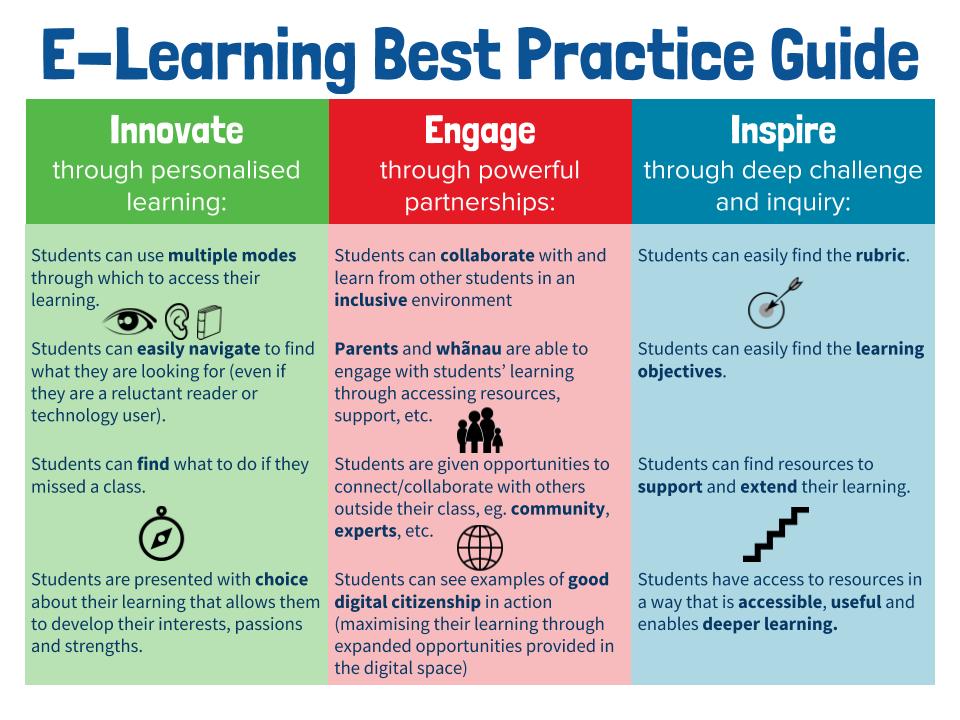
Every lesson begins with a do now in the Google Classroom. Every lesson begins with a self-explanatory 'DO NOW' so that students can come to class and get started on the learning without me. This gives me time to do the roll, talk to late students, check in with students who were away, etc. The whole lesson and learning objective is also outlined in the Google Classroom along with the relevant resources. This means that students who are away can catch up on their learning. Students who finish activities quickly can also move on to the next task. We also add the rubrics and assessments in the about section of the Google Classrooms. Our use of Google Classroom is largely informed by our original HPSS e-learning best practice guide. You will see the influence of assessment for learning and universal design for learning quite heavily in this document. The image below shows the 'should do' section of our best practice guide.

My use of Google Classroom and our best practice guide has been heavily informed by:
  • Hattie, J. (2008). Visible learning: A synthesis of over 800 meta-analyses relating to achievement. Routledge.
  • Hall, T. E., Meyer, A., & Rose, D. H. (Eds.). (2012). Universal design for learning in the classroom: Practical applications. Guilford Press.
  • Absolum, M. (2011). Clarity in the classroom: Using formative assessment for building learning-focused relationships. Portage & Main Press.
  • Voice of our students.


Trello is without a doubt my favourite tools to manage my air traffic controller role. Trello allows me to quickly identify students who are behind or ahead, students who need help, students who are struggling, etc. I set up the tasks students need to work through in each column and the names of the students/groups as cards. As students complete activities, they simply move their cards along. I have even used Trello for assessments since the cards allow you to attach files, set due dates on tasks, add comments, and track your interactions on the board. We also use the labels to signpost if students need help or are making progress.

The reason why Trello is without a doubt one of my favourite classroom e-learning tools is that it facilitates the kind of autonomous student learning environment that I am working hard to develop. Additionally, using this tool in conjunction with agile and scrum has meant that it can also be used to facilitate collaboration as it allows students to see their contributions, progress and involvement.

My use of Trello has been influenced and inspired by:
  • Adkins, L. (2010). Coaching agile teams: a companion for ScrumMasters, agile coaches, and project managers in transition. Pearson Education India.
  • Facer, K. (2011). Learning futures: Education, technology and social change. Routledge.


Trello

Trello


Trello

The latest tool that I have been using is Kialo. The website attempts to do "empower reason through friendly and open discussions." While there are some interesting debates happening on the platform, I have found it's the greatest merit the ability to map out perspectives, evidence, opinions and claims for an argument. Not only can you find some great examples of how to structure an argument, but you can also build your own. We have really enjoyed how everyone in the class can find ways to contribute, whether it is through adding their own claims or evidence to an argument, or whether it is through voting on the impact of others' claims. Additionally, after building an argument collectively as a class, you have created a digital, collaborative artefact to act as a resource for future use.

My use of Kialo has been informed by:
  • Scardamalia, M., & Bereiter, C. (2010). A brief history of knowledge building. Canadian Journal Of Learning and Technology, 36(1). doi: http://dx.doi.org/10.21432/T2859M
  • Hipkins, R., Bolstad, R., Boyd, S., & McDowall, S. (2014). Key competencies for the future. Wellington, New Zealand: NZCER Press.
  • Gilbert, J. (2005). Catching the knowledge wave? The knowledge society and the future of education. Wellington, New Zealand: New Zealand Council for Educational Research.
  • Gilbert, J. (2007). Knowledge, the disciplines, and learning in the Digital Age. Educational Research for Policy and Practice, 6(2), 115-122. doi:10.1007/s10671-007-9022-1
Kialo

As I wrote this post, it struck me just how much my pedagogy has evolved. I have become increasingly focused on translating academic and scholarly work into a workable classroom version. (That means I genuinely enjoy having a good debate about epistemological integrity and then working out what that could and should mean for the class I am teaching this week.) I also recognise some of the early elements of my practice that are still present too. For example, I still think that saving time is a key filter for the tools I use. Electronic grade books, automarking and productivity tools are all a key strategy to juggle the many demands of being a teacher. The time I freed up by getting Flubaroo to mark the quiz was time I could spend on high quality feedback instead! 

So my education friends... I am curious what e-learning tools you use now and why? What is it that has stood the test of time for you? Perhaps it's time for a circa 2014 chain blogging event? Tag three people to share their #edtechevolution?

PS: Some other tools I have used recently include Playposit, Google Cardboard, Kahoot, Quizizz, Google Maps, Google Earth, Google docs/sheets/presentations/drawings, Piktochart, YouTube, Socrative, videonot.es, Read Write for Google, Equatio, iQualify, Khan Academy, Soundcloud, Garage Band, iMovie, Screencastify and so many more! 

Tuesday, February 14, 2017

A quick visual guide to online learning at HPSS

For all those visual learners out there... Here are two visuals that I have developed in my role as e-learning specialist classroom teacher to briefly summarise e-learning at Hobsonville Point Secondary School. The first graphic is aspirational, the second is essential!
PS: All images shared on this blog are creative commons, hence feel free to share.


Thursday, March 17, 2016

Why have an online home for your class?

In an effort to remind myself why I believe in e-learning tools, as we as to encourage others to do the same, I have created a summary that might be useful. Feel free to share and distribute. You can access the Google Drive drawing here for editing and easy sharing purposes.


I would love your feedback on this, as always!

Thursday, January 21, 2016

Digital Citizenship for Adults

There are lots of things out there for kids right now regarding digital citizenship. But I bet sometimes your colleagues' digital etiquette leaves much to be desired too. I've put together a very basic guide with a hint of humour. Feel free to share this office etiquette guide with your colleagues - or print a copy for the office wall

Wednesday, June 4, 2014

Data Detective and a Trifecta of Tools

Flubaroo generate spreadsheet (student names removed)
Maybe it's because I did a science degree, maybe because I am an empiricist. Either way, I like having data to make decisions around. Education rockstar researcher Hattie emphasises how important feedback from the students about how they're learning is. So I wanted to share a trifecta of tools that help the busy teacher use data more effectively.
ideas about gravity before teaching and learning

ideas about gravity after teaching and learning
Step 1: A quick google form at the beginning of a lesson with an open ended question e.g. What do you understand about gravity? Followed with a few multi choice questions that look at common misconceptions about gravity.
Google forms work well on all platforms and devices including smart phones

Then... I use flubaroo (a google docs add on) to grade it very quickly on a spreadsheet. This gives me a spreadsheet with the lowest scoring students automatically in red. Hence, immediately I can move forward with differentiated tasks, team roles etc. based on what the students know.
Flubaroo is a simple to use google apps add on - when in a google spreadsheet, simply click on add ons and then install it


Step 2: Teaching and learning takes places including a range of different strategies.

Step 3: Students take the same test
Then... I use flubaroo again to see if students have made a shift in their understanding. Today, my students shifted from a 1.72 out of 4 to a 2.42 out of 4. I can also then identify which students need more intensive scaffolding or support in the next session.

Finally, I use word it out to paste the answers from the open ended question creating a before and after version with the students' answers. From the before and after I can see that students are now able to describe gravity with the vocabulary that I introduced today including mass, attracted and pull.
Word it out is a free tool that creates a word wall where the size of a word increases based on its frequency in the text that you input.

And with my trifecta of tools I can identify the students that need to be extended next time as well as the students that need to be supported. Using the view summary function in google forms I can also see how many of my students started with misconceptions about gravity and how many finished with the same or perhaps new misconceptions.

Before teaching and learning

After teaching and learning

The reality is that being a data detective just means that I am taking a really brutal, honest look at my own teaching. I can see that students no longer think that only planets have gravitational fields, but I can also see that there are still students who think that the moon has no gravity. 

Sunday, March 23, 2014

E-portfolios are like holidays


I spend a lot of my time thinking, learning, teaching and reading about e-learning, and lately, a lot of this time has been focussing on e-portfolios. Although the concept of a portfolio is not new, the e-portfolio has become increasingly trendy of late. However, personally I hope that e-portfolios transcend trend and make their way into the realm of common practice.

Personally, I think the biggest value in e-portfolios lie in that they exemplify the learning progress. Learning is not a destination, it is a journey. After all, why do people go on holiday? We go for all the experiences along the way. We all have to start somewhere, some of us stay longer in certain places, and ultimately, we may all end up in different places. The experiences along the way is what matters, and I believe learning should be the same. We should be celebrating with students all the amazing things that happen on the way of their learning journey. We should stop to see the sights, and help them make plans when their flights get stranded. Although it is great when we come home, it is the journey that we cherish. Learning is not about the grade that you get, but about the lessons your learnt and the progress you made. I think a well executed e-portfolio does just that. It's a photo album of the holiday rather than the homecoming.

At Hobsonville Point Secondary School, we will be using e-portfolios with both staff and students. For the staff, to document evidence towards the New Zealand registered teacher criteria (RTC), inquiry into their own practice but also as part of the appraisal process. Since there are so many teachers who blog at Hobsonville Point, we have also set up these e-portfolios so that blog posts can be tagged and automatically filed as evidence for the relevant RTC.

Our students will also have e-portfolios. In a school where nothing is the way it used to be, it is a very tough ask for one teacher to be able to report on a student's progress in their seven modules, big project, and dispositional development. (If you don't know about the unique structure of our school, see Claire Amos's post). 

John Hattie mentioned in one of his talks at the Festival of Education that teachers need to be more efficient, in my mind, student e-portfolios is one way that we can be more efficient. Having students collate their work in one place allows teachers to be able to track the learning of students across all their subjects. At Hobsonville Point, this will mean that a student's learning coach will be able to evaluate their progress based on both academic and dispositional goals such as SOLO, the fluencies (problem solving, information and communication), and the hobsonville habits (resilience, compassion, creativity etc). An individual piece of work can have multiple designated tags, one piece of work can thus be used as evidence of a student being resilient, showing creativity and showing evidence of communication. This single piece of work could also be anything from a reflection, a formal assessment, a video, content embedded from another site or even an audio recording. Hopefully, once our students reach year eleven, they will already have some evidence that they can use towards their NCEA accreditation. I was fortunate enough to attend the Mahara Hui in Wellington this week where NZQA (New Zealand Qualifications Authority) expressed how keen they are for moderators to submit student work as e-portfolios. Can you imagine how much postage will be saved? 

So if you are yet to buy in to the e-portfolio trend, don't you think it is time?

Monday, November 18, 2013

Ask not what the internet can do for you, but what you can do for the internet!

Image source: www.unrestrictedstock.com

Did you know, to become a New Zealand citizen if you have not been born here, you are required to swear an oath or  complete an affirmation of allegiance?

I (your name) solemnly and sincerely affirm that ...  ...  ...   I will faithfully observe the laws of New Zealand and fulfil my duties as a New Zealand citizenwww.dia.govt.nz
In England, there is a GCSE called Citizenship Studies which "helps students to develop as active citizens of our democracy." 

What is citizenship? What does it mean to be a New Zealand citizen as opposed to a citizen of another country? What is a good citizen? How do you teach someone to become a good citizen? And should there be a distinction between citizenship and digital citizenship?  

Being a bit of an E-Learning nerd, I spend a significant amount of time thinking about Digital Citizenship. However, working with +Andrew Cowie from the National Library on this subjects recently, I have realised a few more important things... 

Firstly, that although we keep saying digital citizenship, it is really an indication of our age far more than grey hair and wrinkles could ever be. Do you have an email account? Then guess what? You are a digital citizen. Although to a lesser degree than a fourteen year old who documents their whole life through Instagram snap shots or a twenty something year old teacher who blogs about everything she learns at her new school, you are still a digital citizen. Then throw in some online banking, shopping, your iTunes account and your Facebook account. Perhaps you are occupying more of cyber space than you care to think? In fact, how many of us can really function in society without connectivity? +Andrew Cowie proposed that the "digital" might fall away eventually. I agree, but I think that it should already have fallen away. Breaking a law online, is still, breaking a law, hence, you are citizen occupying a physical and a digital space. 

As always, admitting the problem is always the first step. So now that I am aware that I am a (digital) citizen, what should I know? Certainly the traditional ideas of cyber safety are my, and probably your immediate thoughts. Don't give out personal details and so forth. However there is more to it than that. I am directly connected to the world. I have a digital persona that may reflect positively or negatively depending on how what I put out there is interpreted. And that digital version of me has a reach often much further than what I would have had on my own. What is the impact of my words online? They may not break any laws, but certainly they may impact someone's perception of me. Or they may impact someone's perception of the organisation that I work with. And certainly, if you work in New Zealand, chances are, you will meet someone in person at some point.

Although we often focus on the cyber safety and sensibility side of things. We often forget about things such as intellectual property. Do you have the permission to use certain images? When I retweet an image, do I actually have the right to do so? Have you read the fine print of who owns the images you upload to Pinterest, Facebook, Google, Twitter and Instagram? Do you know what a creative commons licence is? 

Being a good digital citizen extends beyond not breaking the law, just as being a good citizen extends beyond not breaking the law. For example I might not break any laws, but I would be considered a much better citizen if I enrolled to vote and actually bothered to vote. Or if politics isn't your thing, I might choose to get involved in my community through girl scouts or other community projects. In the digital world, this may be as simple as clicking the report spam button in Twitter. It may mean that I host events such as #kidschatNZ or that I use the internet to spread the world about a good cause like +Johanna Chambers and her ride for cancer. 

There is also genuine skill that comes into being a good digital citizen. Information is no longer a commodity but being able to sift through information and curate it in a thoughtful, useful and unique way is far more valuable. Or learning to manage online representations of ourselves is certainly also a skill with genuine value. 

Citizenship is about obeying the laws of a country. However being a good citizen is about contributing in such a way that your country benefits from you, and as a result, you from it. Being a citizen you would keep yourself safe and follow the law, but a good citizen contributes. So, ask not what the internet can do for you, but what you can do for the internet. Are you contributing by keeping not just yourself, but others safe too? Are you using the connectivity and reach of the internet to achieve positive things both in a physical and a digital space? And are you really engaging with the potential of the internet? Are you the citizen who never enjoys the beaches, the parks, the public fireworks? Or are you the citizen who embraces the full power of the the Internet's enormous diversity and makes it work for you and those around you in both the physical and the digital worlds you occupy? 

I encourage you to embrace that you are probably like me, a child of two worlds. You live in a physical and a digital space. So I invite you to step up, and live in that space as you would in your home, your neighbourhood and your community. Make it a better place! 

Friday, October 5, 2012

The 3 "C"s of e-Learning Pedagogy


Teachers and Pedagogy go (or should go), hand in hand. I know that there are hundreds, if not thousands of teachers on twitter and the blogosphere who expertly use ICT as part of their pedagogy, allowing students deeper and wider understanding than what would ever have been achievable without technology. Those are the teachers we should be talking to about implementing ICT in our schools because they understand that ICT should not substitute traditional methods of teaching, it should be integrated in teaching in such a way that student learning is improved. We should be teaching our students to be innovative, creative, and entrepreneurial.

As a self proclaimed learning junkie, a university e-learning paper I recently completed took me through some of the factors that influence e-learning in education. The emphasis, across the board seems to be that the lack of ICT uptake in schools is largely based on a need to shift the pedagogy. I bet the teachers on twitter would have guessed that anyway  ICT integration is not students who do research using their smart device. ICT integration is where students do the research, share it, analyse it, critique it, collaborate in critiquing, and then produce a new product using the research. If you want a classroom where students critique, collaborate and create, a shift to the student centred classroom is necessary.

The question then becomes, how do we support our colleagues to make a shift towards the collaborative, critiquing  creating classroom?